
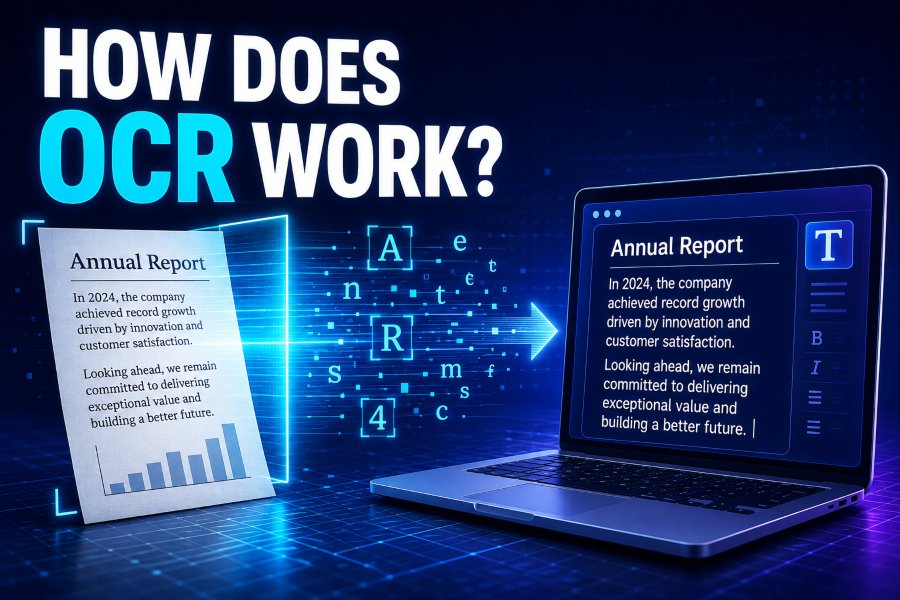
Modern businesses handle thousands of documents every day, from invoices and contracts to forms and scanned records. Managing this information manually can be slow, expensive, and error-prone. This is where Optical Character Recognition (OCR) technology helps by converting images of text into editable and searchable digital content.
Many people use OCR features regularly without realizing it. Scanning a document with a smartphone, copying text from an image, or searching inside a scanned PDF all rely on OCR technology.
Understanding how does OCR work helps explain how computers can recognize letters, numbers, and handwritten content from images. OCR combines image processing, artificial intelligence, and machine learning to analyze visual information and transform it into readable text.
From healthcare and banking to education and legal industries, OCR has become an essential technology for improving document management, automation, and accessibility.
How Does OCR Work and Why Is This Technology Important?
OCR is a technology that allows computers to understand printed or handwritten text from images. Instead of manually typing information from documents, OCR software extracts the text automatically and converts it into a digital format.
The process begins when a scanner or camera captures a document image. The OCR system analyzes the image, identifies text areas, recognizes characters, and creates editable content. This allows users to search, edit, copy, and organize information that was previously locked inside images.
OCR has changed how organizations manage information. Businesses can digitize paper records, reduce manual work, and improve productivity. For example, banks use OCR to process checks, while hospitals use it to organize medical documents.
The technology is also valuable for individuals. Students can convert printed notes into editable files, researchers can search old documents quickly, and visually impaired users can access written content through text-to-speech tools.
As artificial intelligence continues to improve, OCR systems are becoming more accurate and capable of recognizing complex layouts, different languages, and handwritten text.
The Step-by-Step Process Behind OCR Text Recognition
OCR works through several stages to transform scanned images into accurate, editable digital text. Each step helps the system analyze visual information and convert it into a usable format.
Image Capture and Document Preparation
The first step in OCR processing is collecting a digital image of the document. The image can come from a scanner, smartphone camera, or uploaded PDF file.
OCR software improves the image quality by removing unnecessary marks, correcting rotation, and improving contrast.
Detecting Text and Document Layout
After cleaning the image, OCR analyzes the document’s structure. It identifies important areas such as:
- Text blocks
- Paragraphs
- Tables
- Headings
- Images
This helps the system understand where the actual text exists.
Recognizing Characters Through AI
The OCR engine compares detected shapes with stored patterns to identify letters and numbers.
Modern OCR systems use artificial intelligence and machine learning to recognize different fonts, handwriting styles, and languages.
Converting Text Into Editable Data
After recognition, OCR converts the extracted information into formats such as:
- Editable Word documents
- Searchable PDFs
- Text files
- Databases
This makes the information easier to manage and reuse.
What Happens Inside OCR Technology? Core Components Explained
OCR technology depends on several important components working together:
- Image Processing: Improves image quality before recognition begins.
- Pattern Recognition: Matches characters with known examples.
- Feature Extraction: Identifies unique parts of letters, numbers, and symbols.
- Machine Learning Models: Help OCR improve accuracy over time.
- Language Processing: Understands words and sentence structures.
The combination of these technologies allows OCR systems to recognize text accurately, even when documents contain different fonts, poor image quality, or complex layouts.
Modern OCR tools are much more advanced than traditional systems because they do not only identify individual characters. They understand word context and improve results using AI models.
Different Types of OCR Technology and Their Uses
Simple OCR
Basic OCR uses character matching techniques to recognize printed text. It works best with clean documents using standard fonts.
Intelligent Character Recognition (ICR)
ICR uses machine learning to recognize handwriting. It improves accuracy by learning from previous examples.
Intelligent Word Recognition (IWR)
Instead of identifying individual characters, IWR recognizes complete words. This is useful for handwritten forms and documents with repeated terms.
Optical Mark Recognition (OMR)
OMR identifies marks on documents, such as exam answer sheets, surveys, and checkboxes.
OCR APIs and SDKs
Developers can integrate OCR features into applications using APIs and software development kits. These tools allow businesses to build custom document-processing solutions.
How OCR Technology Helps Businesses and Everyday Users
OCR provides benefits across many industries by transforming paper-based information into useful digital data.
Business Document Automation
Companies use OCR to process:
- Invoices
- Receipts
- Contracts
- Employee records
- Financial documents
This reduces manual data entry and improves workflow efficiency.
Healthcare Information Management
Hospitals use OCR to organize:
- Patient records
- Medical reports
- Prescriptions
- Insurance documents
Quick access to digital records helps healthcare professionals make faster decisions.
Education and Research
OCR helps students and researchers convert books, articles, and handwritten notes into searchable digital formats.
Accessibility Improvements
OCR supports visually impaired users by converting written text into speech through screen readers and assistive technologies.
The Future of OCR: AI, Automation, and Smarter Recognition
OCR technology continues to evolve with artificial intelligence. Modern systems are becoming more accurate, faster, and better able to handle complex documents.
Future OCR improvements may include:
- Better handwriting recognition
- Real-time document scanning
- More language support
- Improved understanding of document context
- Integration with generative AI tools
AI-powered OCR will allow businesses to automatically analyze documents, extract important information, and make smarter decisions.
As digital transformation continues, OCR will remain an important technology for reducing manual work and improving access to information.
Conclusion
Understanding how does OCR work shows how powerful technology can transform images and documents into useful digital information. OCR combines image processing, artificial intelligence, and machine learning to recognize text and make it searchable, editable, and accessible.
From automating business processes to helping students, researchers, and visually impaired users, OCR has become an important part of modern digital workflows.
As AI continues to improve, OCR will become even more accurate and useful, helping organizations manage information faster while reducing dependence on manual data entry.
FAQ’s
What does OCR stand for?
OCR stands for Optical Character Recognition. It is a technology that converts printed or handwritten text from images into machine-readable digital text.
How accurate is OCR technology?
Modern OCR systems can achieve very high accuracy, especially when documents are clear. AI-based OCR tools continue improving recognition quality.
Can OCR recognize handwriting?
Yes. Advanced OCR systems using Intelligent Character Recognition (ICR) can analyze and convert handwritten text into digital formats.
What types of files can OCR process?
OCR can process scanned PDFs, images, photographs, screenshots, and other document formats containing text.
Where is OCR commonly used?
OCR is widely used in banking, healthcare, education, legal services, government records, document automation, and accessibility tools.
Is OCR safe for business documents?
Most professional OCR solutions include security features to protect sensitive information. Businesses should choose trusted OCR providers with strong privacy policies.

Join the discussion
0 responsesNo comments yet. Share your experience or ask a question below.